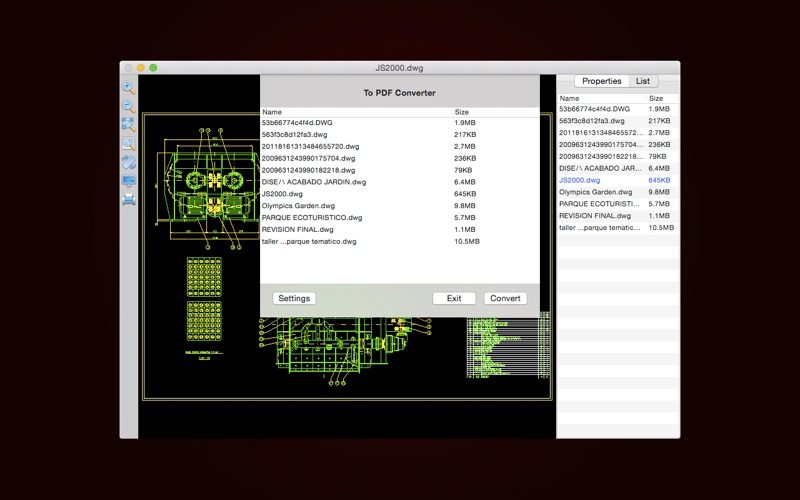
A multifunctional tool for viewing and coverting 2D CAD files in Mac. CAD Lab 2D provides you with a powerful file list, because of it, you can easily manage your CAD files, for example, you can locate your CAD files' storage location, or batch convert CAD files to PDF, or batch convert versions of DXF and DWG files, or batch convert storage format of DXF and DWG files and so on. As a 2D CAD Viewe
🍎 On the App Store
View on the App Store →
A multifunctional tool for viewing and coverting 2D CAD files in Mac. CAD Lab 2D provides you with a powerful file list, because of it, you can easily manage your CAD files, for example, you can locate your CAD files' storage location, or batch convert CAD files to PDF, or batch convert versions of DXF and DWG files, or batch convert storage format of DXF and DWG files and so on. As a 2D CAD Viewer, it is very good, it can completely display all the objects of AutoCAD drawings.
Supported file versions:
DWG: AC1006 (dwg version 10), AC1009 (dwg version 11 or 12), AC1012 (dwg version 13), AC10…
Add features: Export to Images, including JPEG, BMP and PNG. Add features: Double-click on local CAD files to open CAD Lab 2D, including DWG, DXF, DWF, DAE and DGN files. Add features: Print CAD files, set print parameters according to the need. Support mode: Display, Extents and Window.



Influencers sponsored by 晖 向
📣 Pitch 晖 向
Sign up & claim your channel to pitch 晖 向 — we introduce you with your stats so you don't have to cold-email.
Sign up & claim free →Already have an account? Log in
You're out of free requests this month
Free accounts get 5 per month. Go Pro for unlimited sponsor pitches, collab requests & sponsorship deals — plus featured placement, the Verified badge, free withdrawals and more.
Upgrade to Pro — $9.95/mo →Your free limit resets on the 1st of next month.